





The Electronic SEC Universal Registration Environment (eSECURE) is a digital platform developed by the Securities and Exchange Commission (SEC) of the Philippines that serves as a centralized system for accessing its various online services. It is designed to provide a secure, easy, and convenient way for individuals and organizations to manage their SEC-related transactions online.
Through eSECURE, users no longer need to interact with different SEC systems separately. Instead, they only need one account—their eSECURE account—to access multiple SEC services online.
What are the functions of eSECURE?
The Electronic SEC Universal Registration Environment (eSECURE) acts as a comprehensive digital gateway, streamlining interactions with the Philippine Securities and Exchange Commission. Instead of navigating disparate online systems for various SEC needs, eSECURE consolidates these services under a single, unified platform, accessible through a single user account. This eliminates the need for multiple logins and simplifies the overall user experience.
- Centralized Account Management: eSECURE empowers users to establish and maintain a singular account that serves as their credential for accessing all available SEC online services. This simplifies user management and provides a consistent experience across different functionalities.
- Online Submission of Documents: The platform facilitates the electronic submission of a wide array of documents, including initial applications, subsequent amendments to existing registrations, and mandatory periodic reports. This digital submission process reduces the reliance on physical paperwork, accelerates processing times, and enhances efficiency.
- Electronic Identity Verification (eKYC): eSECURE incorporates an electronic Know Your Customer (eKYC) system to securely verify the identity of users. This digital verification process streamlines the identification process, reducing the need for in-person appearances for initial identity confirmation. The basic level of eKYC ensures the claimed identity, while more advanced verification tiers may involve additional methods to provide a higher degree of assurance.
- Consolidated Transaction Tracking: eSECURE provides users with a centralized dashboard where they can monitor the status of all their SEC-related transactions. This feature offers enhanced transparency and allows users to stay informed about the progress of their applications, submissions, and other interactions with the SEC.
- Enhanced Security and Convenience: By centralizing access and implementing secure verification protocols, eSECURE aims to provide a significantly more secure and convenient experience for users engaging with the SEC’s online services. This includes secure data transmission and storage, as well as a user-friendly interface.
eSECURE employs a multi-layered approach to identity verification, starting with basic electronic checks (eKYC) to confirm the user’s claimed identity. For transactions requiring a higher level of assurance, the system may incorporate additional verification measures. These advanced methods can include scheduled visits by authorized couriers to verify physical presence or the utilization of remote biometric authentication technologies. This tiered system ensures appropriate levels of identity verification based on the sensitivity and nature of the SEC transaction being conducted.
How to Register in eSECURE?
1. Click “Register Now”: Start by clicking the “Register Now” button on the eSECURE platform.

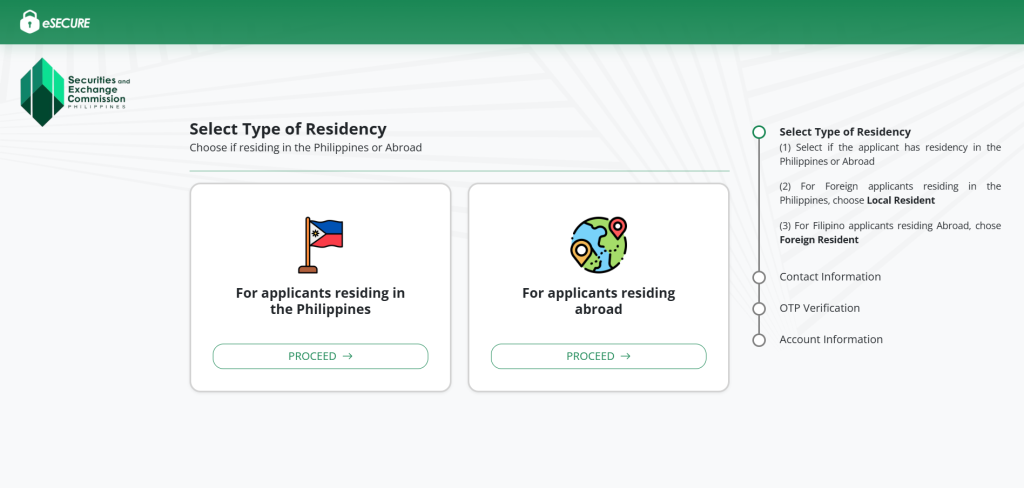
2. Select Type of Residency:
- (1) Choose whether the applicant is a resident of the Philippines or abroad.
- (2) For foreign applicants living in the Philippines, select “Local Resident”.
- (3) For Filipino applicants residing abroad, select “Foreign Resident”.
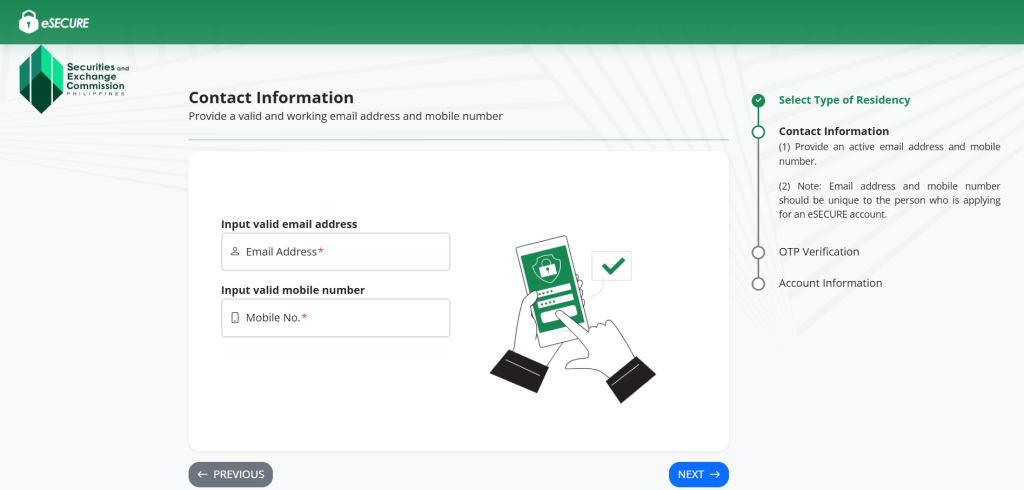
3. Enter Contact Information: Provide your email address and mobile number.
4. OTP Verification: You will receive a One-Time Password (OTP) via email and SMS. Enter both codes to proceed.
Comprehensive, Efficient, and Compliant
Let us handle your compliance needs with government agencies, so you can focus on growing your business without the worry of penalties or interruptions.

5. Account Information: Complete the account creation process by filling out the required information for your eSECURE account.
Accepted Government-Issued IDs for eSECURE Credentialing
To complete the credentialing process, you’ll need to present one of the following valid government-issued IDs:
- Driver’s License
- PhilHealth ID
- Philippine National ID (PhilSys ID)
- Postal ID
- Passport
- Social Security System (SSS) ID
- Unified Multi-Purpose ID (UMID)
Voter’s ID
Make sure your chosen ID is valid and clearly shows your full name, photo, and date of birth for a smooth verification experience.
eSECURE Online Services
The eSECURE platform is designed to provide a streamlined and user-friendly experience for accessing the SEC’s digital services. Through eSECURE, users can conveniently manage and complete various transactions online, including:
- eSPARC – Electronic Simplified Processing of Application for Company Registration
- eAMEND – Online Application for Modifying Registered Entity Information
- eFAST – Electronic Filing and Submission Tool for reportorial requirements
- eSEARCH – SEC’s Digital Hub for Education, Analysis, and Research
- eRAMP – Electronic Registration System for Capital Market Participants
- SEC API Marketplace – Centralized access to SEC data and application programming interfaces
- ACES – Automated Certification and Examination System for licensing and compliance
- SEC Appointment System – Online booking for in-person or virtual appointments with the SEC
These services are integrated to help users complete regulatory processes efficiently, all in one secure environment.
Credentialing Fees and Charges
Users undergoing the eSECURE credentialing process will be subject to the following fees, which cover identity verification and account maintenance through the platform’s eKYC (electronic Know Your Customer) system:
Type of Transaction | Description | Fee (VAT inclusive) |
Initial Credentialing | Covers account creation and a 2-year subscription with the eKYC provider | ₱400.00 |
Additional Credentialing | Charged if another credentialing process is required due to changes or updates | ₱100.00 |
Credentialing Renewal | Applicable upon renewal of the credentialing subscription | ₱250.00 |
These fees ensure a secure and verified user identity for safer access to SEC’s online services.
Registering with eSECURE is your first step toward a more secure, convenient, and fully digital interaction with the Securities and Exchange Commission (SEC). By creating your account and undergoing the credentialing process, you gain access to a wide range of online services—all in one platform. Stay compliant and transact with confidence through a verified SEC digital identity.
… and you might just need our assistance.
Don’t wait—register now with eSECURE and streamline your SEC transactions. Set up a consultation with FilePino today! Call us at (02) 8478-5826 (landline) and 0917 892 2337 (mobile) or send an email to info@filepino.com.




12 Responses
do you assist to retrieve ESECURE account, email use in registration is forgotten
Hi Adelle, Thank you for reaching out. Unfortunately, we do not assist with retrieving or recovering ESECURE accounts, especially if the registered email is forgotten. We recommend contacting the BIR directly or visiting your assigned Revenue District Office (RDO) for assistance.
Let us know if you need help with anything else related to BIR compliance or documentation. Thank you.
Good evening maam pls may I know my LOGIN thank you
Hi Russell! Thank you for getting in touch with us. We appreciate your message. Please note that we are not affiliated with the SEC and, as such, do not have access to user accounts. Our services are focused on SEC filing assistance. If you require support with SEC filings or have any related inquiries, feel free to contact us at (02) 8478-5826 (landline) or 0917 892 2337 (mobile). You may also email us at info@filepino.com, and we will be happy to assist you.
Hello, why can’t a Malaysian create an account? The failure says there’s a first name/last name mismatch. He can’t complete the verification even though all the submitted names are correct.
Hi, Chester! The SEC eSECure system currently validates accounts using Philippine-issued IDs. Foreign nationals, like Malaysians, may encounter a name mismatch error because their details cannot be cross-verified. We recommend contacting SEC support at http://www.sec.gov.ph for manual assistance.
Do you know the ID requirements if residing abroad?
Hi Maan! For eSECURE registration of individuals residing abroad, accepted IDs typically include a valid passport or driver’s license. You can view the full list of accepted IDs in the dropdown menu during the registration process on the eSECURE platform. If you need further assistance, feel free to call us at (02) 8478 5826 (landline) or 0917 892 2337 (mobile), or email us at info@filepino.com. We’re happy to help!
My name has a “Jr”, where will I place it? After my first name or after my surname?
Is ESECURE particular with names with “ñ” ? What will I write just plain n or ñ or it doesnt matter at all? Thank you
Hi Efren! Thank you for reaching out! Based on our experience, this matter needs to be coordinated directly with the SEC. If you need any further assistance, you may call us at (02) 8478-5826 (landline) and 0917 892 2337 (mobile) or send an email to info@filepino.com.
Hello po, ano po ang gagawin namin upon verifying account hindi po mag match ang ID na in upload namin at saka sa system, bur per checking the same ra po sila, ano po ang gagawin ?
Hi Shen! Thank you for reaching out. While we are not directly affiliated with the SEC, we’re unable to assist with technical issues related to the SEC eSecure registration system. We recommend coordinating directly with the SEC for further assistance regarding your concern.